
When you have printing issues on a Mac, often removing the printer and reinstalling it will fix the problem. Here’s how to do it.
How can I download a YouTube Video?
Q: I’ve been searching all over the web to find a way to insert a youtube video into a keynote presentation, but with no luck so far. Keynote will accept videos I shot with my old iPhone, but I don’t see a way to save youtube videos, although I know it can be done. I also know they should be MP4 files, but I’ll get to that later.
A: Here is the way I have found to do it. First note to the YouTube video you want to download and save the URL to the clipboard. Now Go to http://www.tubegrabber.net.
 Insert the URL in the download box and press download now.
Select either Low definition MP4 or High Definition MP4 as the format
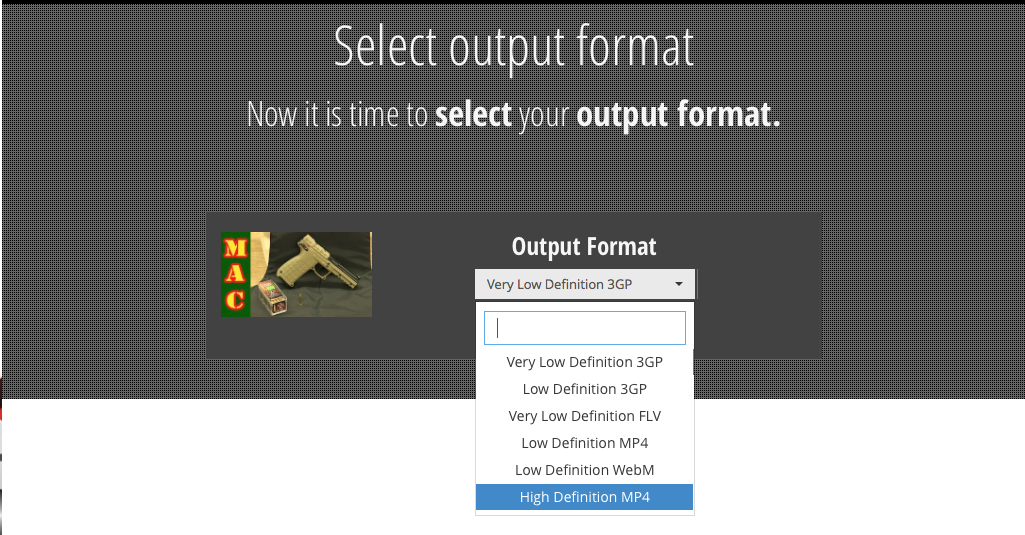
Press Start Download

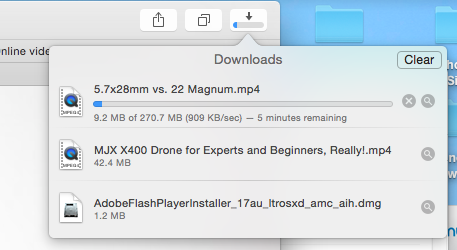
The video will be downloaded to your downloads folder.
Beware of Malware installed with Java
For years, Windows users have had to deal with malware installed on their computers. One of the big ones that I see a lot is a toolbar from the company “Ask”. Ask, once installed takes over you’re searching and adds toolbars for providing pop up messages and redirected finds when you’re looking to purchase something on the web. Many people don’t realize that this toolbar is truly malware. It is install through various third-party installers that usually bundle at with their product and are paid by Ask. I cannot count number of times I’ve had to uninstall this and reset the search engines for Windows users.
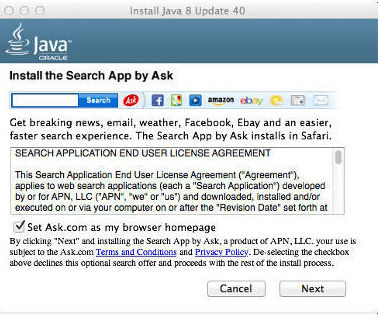 For a long time Mac users have won in parity with Windows users when it came to software purchased for their machines. Well Mac users can be proud the now when it comes to malware from ask they have absolute parity with Windows computers. In the latest release of Java, Version 8 update 40, Oracle has included Ask malware with the install. Mac users that have Java installed we’ll get a notice that they have an update, when they click the update button it will download the Java update software. This software runs do a standard install but once the install begins it pops up a dialog box that looks like the one below. Ask is depending on the fact that people are busy and will continue to just press the next button to get the software installed because they precheck the box that allows them to install the software. It certainly is easy enough for Mac user, or a Windows user for that matter, to uncheck the box and not get this malware installed. But Malware depends upon laziness from the user and this company is counting on just that. Most people will just hit the next button and let the software be installed, only to find out when they next run their browser that their home pages been changed, their search engine has been change, and a toolbar for Ask has been installed in their browser.
So the next time you update Java, really installer dialog box and uncheck the box to install this Ask malware.
What’s the story on cookies in your web browser these days?
 Q: How about a rule of thumb for cookies? I recently discovered that my cookies were causing login problems for a site that I use to order medications.
A: It used to be, that cookies were a real problem for browsers. Websites would store information about you and then use it too direct you to places they wanted you to go. Some advertising still tries to do this. Have you ever searched for something you’re looking to buy only to find that many websites you go to now have it in their sidebar. It’s a little annoying but it’s the way the web works..
Over the last few years browsers have become more intelligent on how they deal with cookies. Most advertisers have realized that using your information to try to sell you something when you’re not asking really doesn’t work. As a result I don’t necessarily believe you need to delete all of your web browser cookies as many people used to recommend. So many websites use these cookies to make our experiences better and deleting them keeps that from happening. Not only that, legitimate websites are using cookies to assist you in being remembered, setting your preferences, and helping you to find things that are actually a real benefit.
In my opinion, the days of suggesting that you delete all your cookies, or prevent your browser from storing cookies are really over. So my recommendation is to review your cookie settings and allow your browser to store them, or at least some of them.
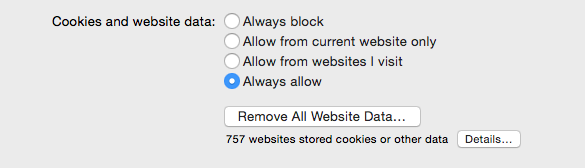
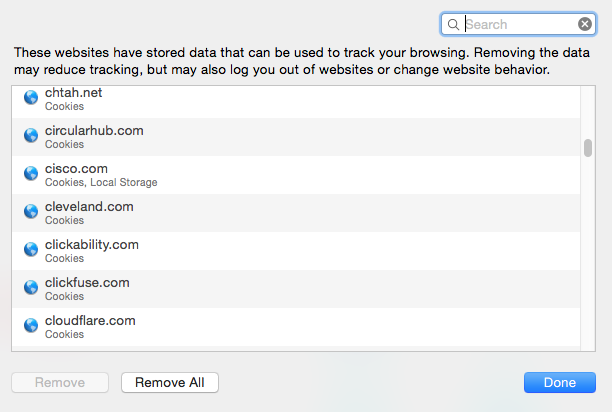
In Safari, this is under privacy preferences. As you can see from the dialog box, using “Allow from websites I visit” or even “always allow” is probably a reasonable setting.
In this case of the problem you were having where the cookie was causing problems it certainly is a time to delete it. But most web browsers give us the ability to delete individual ones rather than all the cookies. In Safari, to remove all the cookies you would press remove all website data. But if you have a particular website you want to remove the cookie from, you can press the details button. From this dialogue. This allows you to remove a single cookie causing a problem. Find the site you want to remove and press “Remove”.
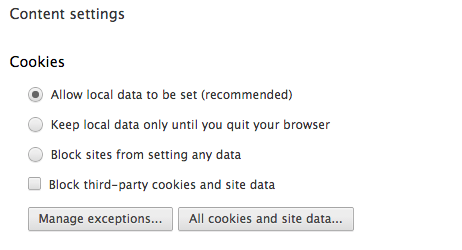
In Chrome, it’s a little more difficult to find. first go to preferences in chrome then scroll to the bottom and click “Show advanced settings”. Under the privacy area press the content settings button. This is where you find your cookie preferences.
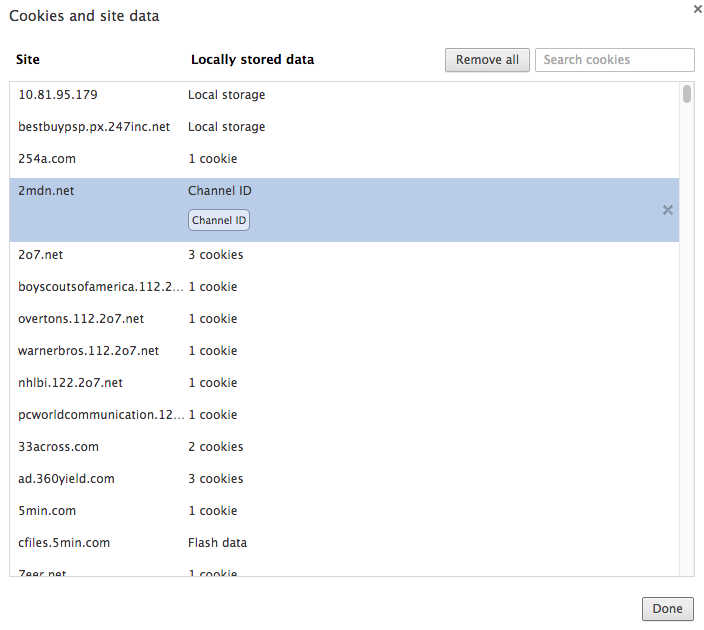
Now press the All cookies and site data..” button and you’ll find where to go to delete individual cookies. Again, find the site you want to remove, select it, and press the small “x” on the right side.
in general cookies are not a bad thing anymore. I believe they enhance our experience on the web and make surfing easier. So don’t be afraid of cookies anymore.
Outlook sends attachments as Winmail.dat
 Q: Many of my colleagues tell me that when I send them a PDF file as it comes to them as a file called winmail.dat. They try to open it but are never successful in being able to see the PDF. What are they doing wrong?
A: it’s very likely they’re not doing anything wrong. It’s quite possible your email client is telling the PDF to be sant in a format they can read. I suspect your using Microsoft Outlook to send the email. Out of the box outlook wants to send email in the default Microsoft RTF exchange outlook format. If the person your sending to has Outlook, they don’t have an issue. If the mail provider has software to convert this on the fly, they don’t have a problem either. But some mail providers, particularly local Internet service providers, don’t do this and send the email in whatever form it comes in.
Fortunately, the solution is extremely simple. All you need to do is change your settings to send mail in a more common format that doesn’t require conversion. Here are the steps:
- Open up your Outlook email client.
- Click on File located in the upper toolbar.
- Select the Options setting.
- From here, select the Mail category.
- Now, under Compose messages, you want to ensure the HTML or Plain Text option is selected for the Compose messages in this format.
- Next, underMessage format, set When sending messages in Rich text format to Internet recipients to Convert to HTML format or Plain Test format
- Click OK to finish.
If that doesn’t solve the problem,Microsoft has a technical note that might assist. Here’s a link to it.
What is iTunes match?
 Q: What is iTunes match and how does it work?
A: These days, many people have very large music libraries on their computer. It’s great to be able to choose the music you want to see based upon your mood of the day. But on our iPhones and iPads we have much less space to hold the music that we we have forcing us to make choices. But how am I going to feel today or tomorrow?. Apple does provide a way to have all of your music available on all of your devices all of the time. Apple calls it iTunes match.
Recently, I’ve had a couple of people ask me about iTunes match. ITunes match is a service Apple provides for $24.95 per year. ITunes match allows us to put our entire music library in the cloud and download only the songs you want to listen to at the time.
Here’s how Apple describes it….
iTunes determines which songs in your collection are available in the iTunes Store. Any music with a match is automatically added to iCloud for you to listen to anytime, on any device. Since there are more than 43 million songs in the iTunes Store, chances are your music is already in iCloud.3 And for the few songs that aren’t, iTunes uploads what it can’t match (which is much faster than uploading your entire music library). Even better, all the music iTunes matches plays back from iCloud at 256-Kbps AAC DRM-free quality — even if your original copy was of lower quality.
Once your music is in iCloud, you can play it from any of your devices. Just browse the complete list of all your music stored in the cloud and tap to play to it. You can store up to 25,000 songs in iCloud (more if songs are purchased from the iTunes Store), but only what you play or download is stored on your device. Tap the iCloud download button to download music from an artist, album, or playlist. So you have immediate access to a huge music library without having to worry about the storage space on your device.
On a computer, any songs stored in iCloud will stream over the air when played, though you can download them at any time by clicking the iCloud download button. iOS devices will start playing tracks from iCloud as they download and will store them so that you can listen to them later even if you don’t have a network connection. Apple TV only streams songs.
One great thing about iTunes match is that it’s tied to your iTunes account or your AppleID. This way you pay the fee one time and have access to your music on all of your devices for a year. If this ability sounds interesting to you, here is where you need to go to learn about how to subscribe.
MacOS Enhanced Dictation
 One would have to wonder why Mac OS has a harder time doing dictation than the IOS does? I have always felt that Siri dictation on the iPad and iPhone works very well. That doesn’t mean you don’t have to read your text. You still need to read whatever you dictate just to be sure that it got right. One of the real enhancements to dictation in iOS8 was he ability to be able to see the text as you speak it. But out-of-the-box, your Mac even in Yosemite doesn’t work that way. It works away IOS used to work in that you didn’t see the text until you’re finished with a dictation.
What many people don’t realize is that MacOS also has an enhanced dictation mode. Enhance dictation basically turns the dictation function into the way IOS works today. As you speak your text shows up on the screen. Enhance dictation mode is easy to turn on. If you go to system preferences, and select dictation and speech. The first step is to turn dictation on. Once you’ve done that you’ll notice there’s a check box for use enhanced dictation. The first time you check the box your computer will download the dictation libraries and install them. Once that’s completed you’ll find whenever you dictate to your computer the text will show up as you speak.
While you’re in the dictation and speech dialogue you can also change the shortcut key. By default it’s set to press the function key twice to turn on dictation. If that keystroke doesn’t work for you you can easily change it to a few other options Apple provides.
With enhanced dictation turned on your find your Mac actually understand you a little better and you have better comfort in doing dictation because you can see the words come up as you speak. Give it a try.
Adware – coming to a Mac near you
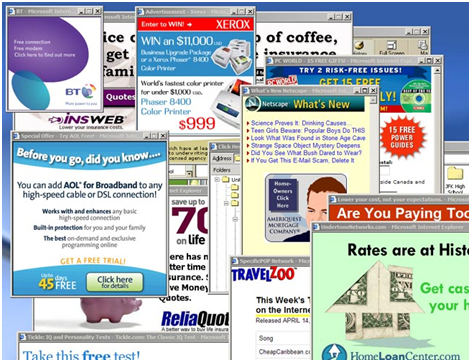
As most of you know the consulting work that I do requires me to work on both Macintosh computers and Windows machines. For years one of the biggest difficulties I see with Windows has been Adware. Wikipedia defines adware as:
… any software package which automatically renders advertisements in order to generate revenue for its author. The advertisements may be in the user interface of the software or on a screen presented to the user during the installation process. The functions may be designed to analyze which Internet sites the user visits and to present advertising pertinent to the types of goods or services featured there.
That’s pretty much exactly what it is. It’s not a virus. It’s more of an annoyance than anything else. Adware has the ability to hijack what you were doing on the Internet and send you information from or possibly even to a website different than what you were looking for. Adware can be subtle. It may send you to websites that are similar to what you were looking for but not exactly the same in an effort to get you to purchase things from a different vendor. It may take over your entire search function on your computer and never allow you to search sites that you want. In this case it only sends you to sites the adware developer wants you to see.
For years a large portion of the problems I see in Windows are related to adware. I always characterize it as software that has its friends. On Windows it’s very common for one Adware infection to lead to many more because the software itself goes out and downloads other adware or malware to install on your computer.
There are great tools in windows to remove much of this like Malwarebytes that allows you to remove much of this adware and clean your computer up. But typically an Adware infection is accompanied by many other problems on a Windows computer.
The purpose of all this background is to give you an idea of what Adware is. But the real news is that Mac users are now beginning to join the adware fold with their windows counterparts. In the last week, for the first time that I remember, I ran into a serious adware infection on a Macintosh computer. The person infected was a sophisticated long term Macintosh user who made the simple error of clicking okay to a pop that told them to update their flash player.
Just like on windows this infection was buried down deep into the operating system and difficult to find and remove. But fortunately like windows there is a utility out there that seems to do a good job in this particular case. After removing many parts of this by hand I ran across a product called Adwaremedic and after reading many Google reviews of it ran in to do the final cleanup on the machine. It seems to have done a great job but having only needed to use it once it’s hard to give it a golden recommendation yet.
The main thing to keep in mind for Mac users is they need to think about safe computing just as Windows users have had to do for years. Here are a few things to consider as you surf the web on your Macintosh:
- Never respond to pop up windows. Always close them using the close button in the window dialogue rather than the cancel button on the window itself.
- If your computer tells you something needs to be updated in a pop up window never do it there. If it’s flash player, go to Adobe’s website and download flash player from there. Never accept the help that a popup is trying to give you.
- Be careful when installing applications that are downloaded from places you’re not familiar with. In Windows I found out the hard way that even a well respected site like CNET has massive amounts of malware in their download section.
- Be careful installing free applications. If it seems to good to be true, it probably is.
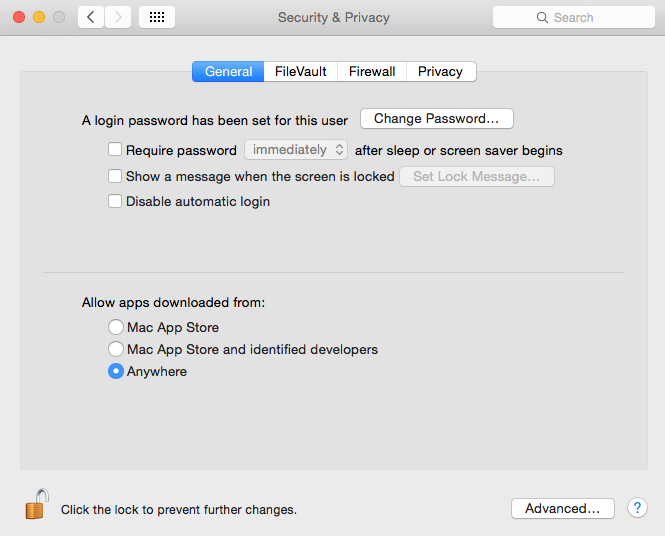 Apple has done a great job to keep us from having to deal with this for years. New versions of Mac OS even prevent us from downloading applications outside of the App Store by default. But there still too many of those out there and typically that has to be turned off to be able to install software you need to use.
To me, it looks like more of these are going to start popping up on our Macs and continue to be a real problem on Windows. Practicing safe computing can keep your machine clean whether it’s a Windows computer or now even a Macintosh.
Apple “Photos ” iPhoto replacement is right around the corner
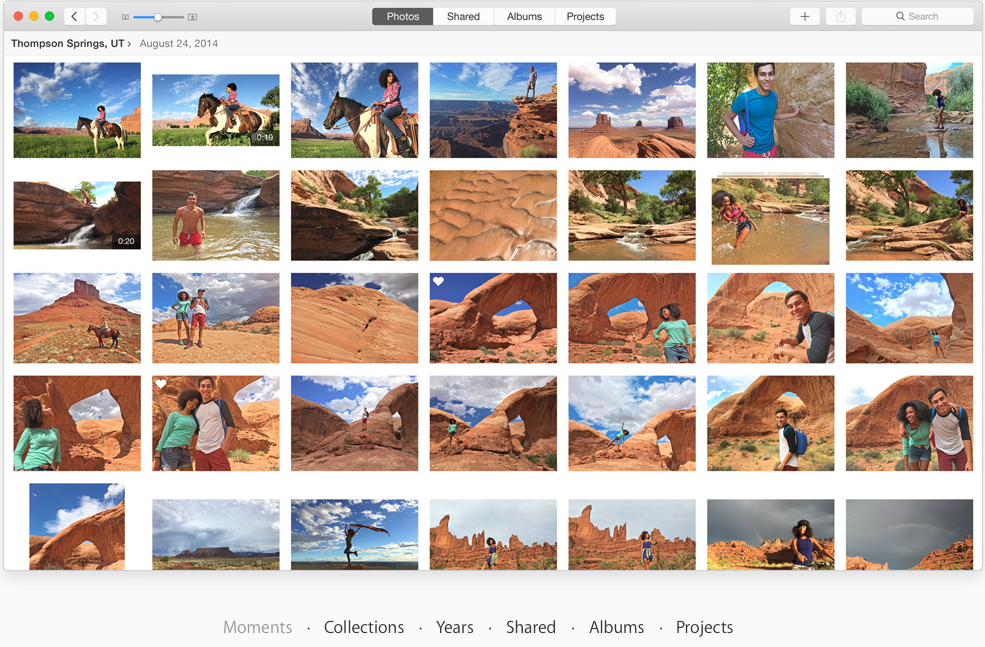 Early last year, Apple announced it was working on a New photo application for the Mac called Photos. Later in the fall, Apple confirmed rumors that iPhoto and Aperture we’re going to go away and be replaced with this new application. They also said the application will be delivered in the first part of 2015. Well here we are in the first part of 2015 and early reports and reviews of this new Photos application are starting to hit the web.
While II have not actually seen the new application, I have read a number of reviews and descriptions of how it works. Many of these descriptions discuss the abilities of the app and some of them also describe the things the application will be missing when it’s first released. Overall, it looks like the new Photos application is going to be pretty nice and make some interface improvements from what we’re used to and iPhoto.
First off, there has been a lot of conjecture as to what the look and feel of the new application would be like. Just as I suspected, we’ve all been using Photos for a while now. At least those of us using iOS8. If you’re interested in the overall look and feel of the new photos app, take a look at Photos on iOS. The basic make up of the application is going to be very similar to what we’re seeing on the iOS version. Just as we’ve seen before, Apple continues to try to merge the interface of the iPad and iPhone with that of the Mac. This time though, it’s not the Mac features that are moving to the iOS, it’s the iOS app it’s moving to the Mac.
If you become comfortable with the moments, collections, shares, and cloud features in iOS8 photos, the new Mac application is going to be very familiar to you. Looking at screenshots that have been posted on the web, much of what you’re going to see on the Mac is similar to what you’re seeing on iOS today. Now don’t get me wrong, editing features on the Mac will be worlds ahead of iOS but still not quite up to the level of iPhoto. Apple will continue to add new features overtime as they generally do when they rewrite an application. We’ve seen this with their applications like iMovie.
Basically out of the box Photos is going to be very functional, provide nearly all of the things you normally do with photos in iPhoto, and provide one nice benefit. Photos, will directly read your iPhoto or Aperture library. There will be no conversion, no duplication of space, and no possibility of having things mixed up when you move to the new app.
Apple announced that it’s going to make a pre-release version available very soon for us to begin to learn and play with, and make the initial app release with Mac OS 10.10.3 this spring. I’m looking forward to getting an opportunity to work with it and also being able to write more about it. I can also pretty well guarantee that when the application is released, if your local to Jefferson City, we’re going to dedicate an appleJAC Macintosh user group meeting to this new application.
Neither iPhoto or Aperture will be going away immediately. Even the next release of the MacOS will continue to work with these applications. But like many things in life, change is inevitable, if you stick to iPhoto too long and don’t try the new application you’re going to get left behind and end up not being able to update your computer to the latest operating system, or forcing a move to the new application when you’re not ready. So my recommendation to you is as soon as the new release comes out in MacOS 10.10.3, start taking a look at the new photos app. We’ll have to see how well it works before we can make a final determination of whether that will be the time to move, but I’m absolutely sure the new application will be functionally complete enough for you to deal with most of your photo needs right out-of-the-box.
Here are a few good early reviews from people that have been able to work with the new Photos application.
George talks about Quadcopter Flying
A friend of mine, Steve Mays, asked me to sit with him and answer some questions about drones and some of my experiences in flying them.